HoundHealth Drupal E-Commerce Website
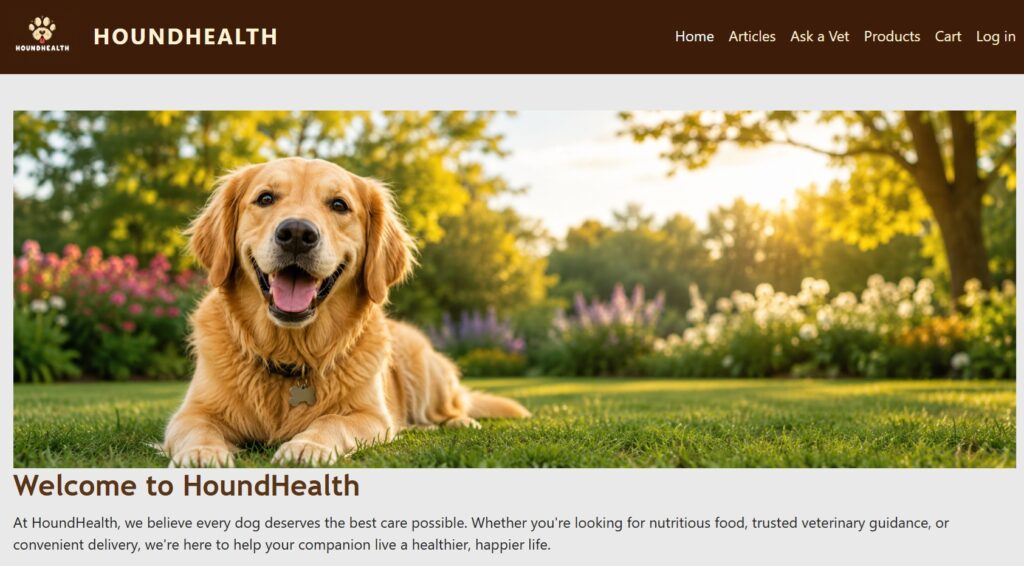
HoundHealth is a responsive Drupal 11 website I designed and developed in a Pantheon sandbox environment for a fictional canine health and wellness brand.
The project includes a product catalog and e-commerce functionality with Drupal Commerce, subscription-based food products, a working cart and checkout process, article content, an Ask a Vet contact form, responsive layouts, and custom site-wide styling. I built and configured the site using Drupal Views, Layout Builder, Bootstrap 5, CSS, Pantheon, and Git/Composer workflows.
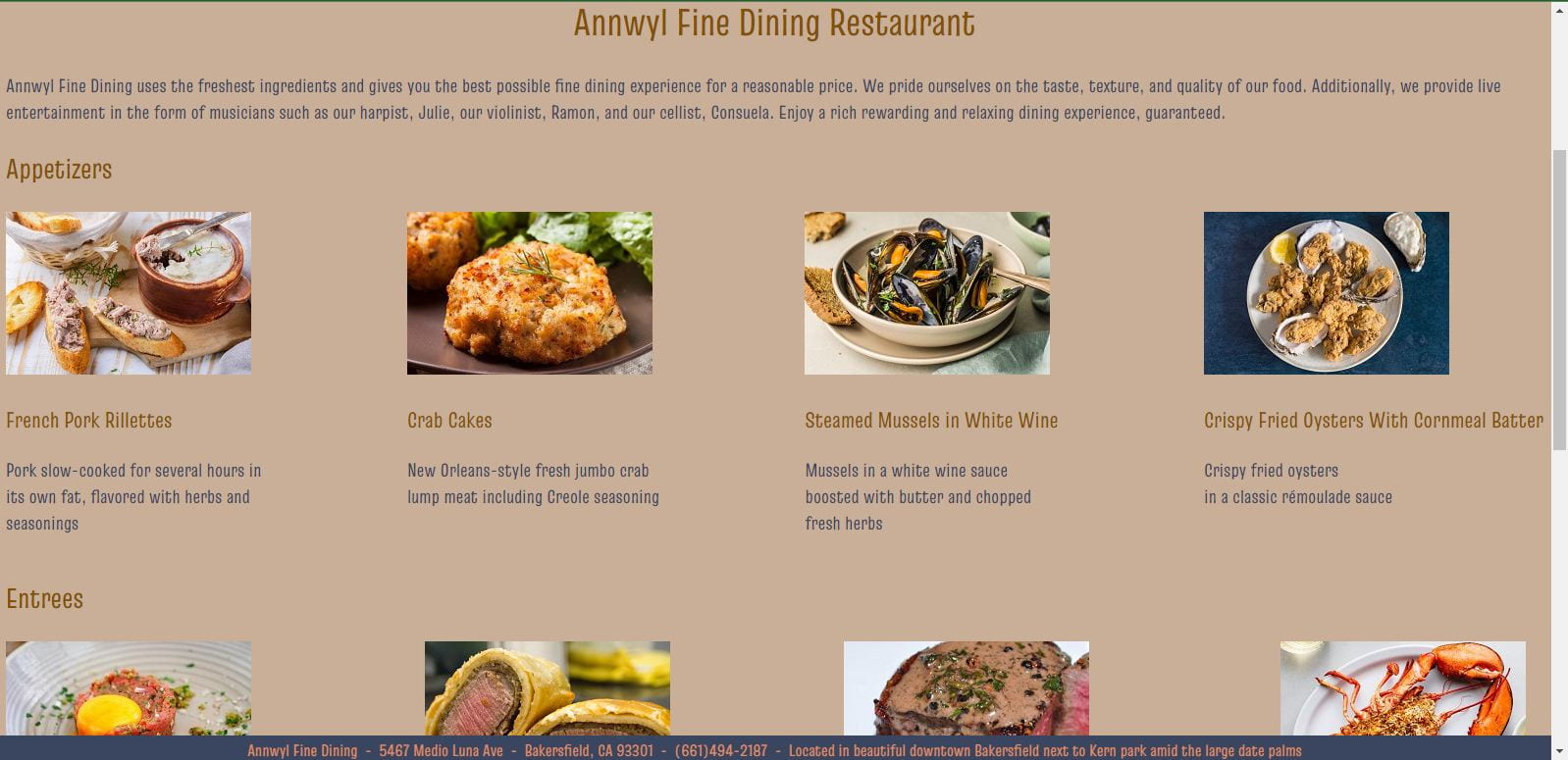
Sample Webpage Using HTML, CSS, JavaScript
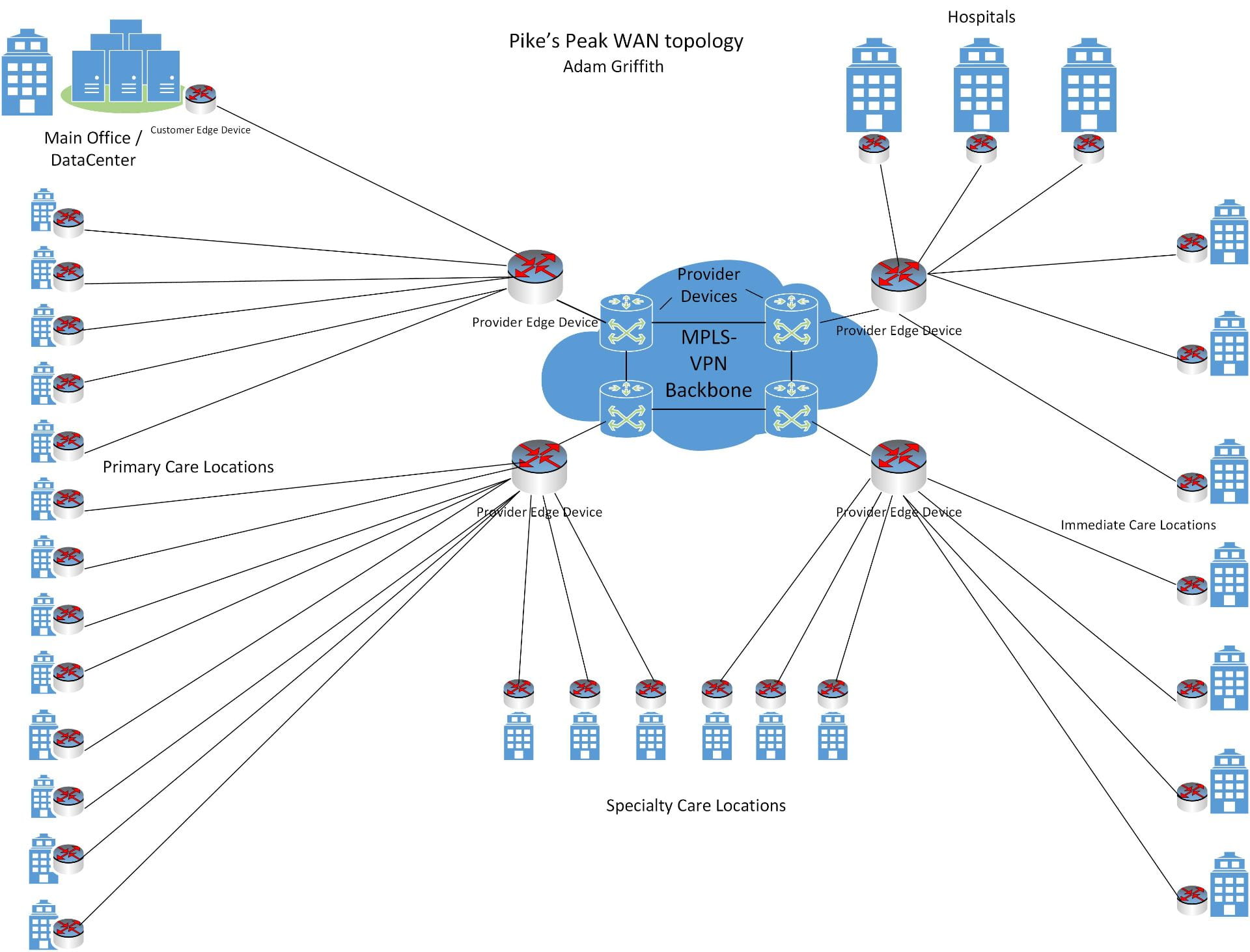
WAN Network Topology
Corporate Subnetting
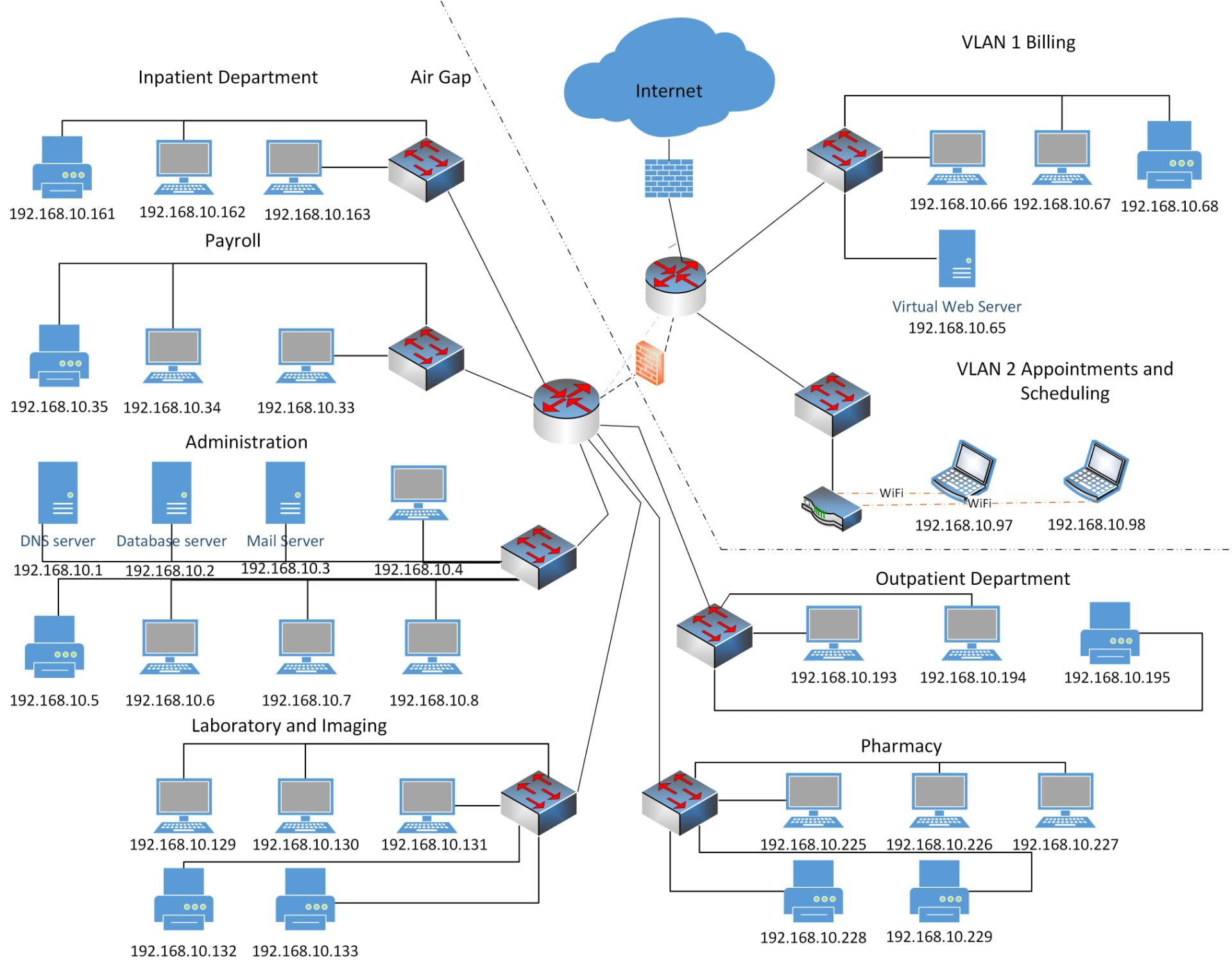
Screened Subnetting
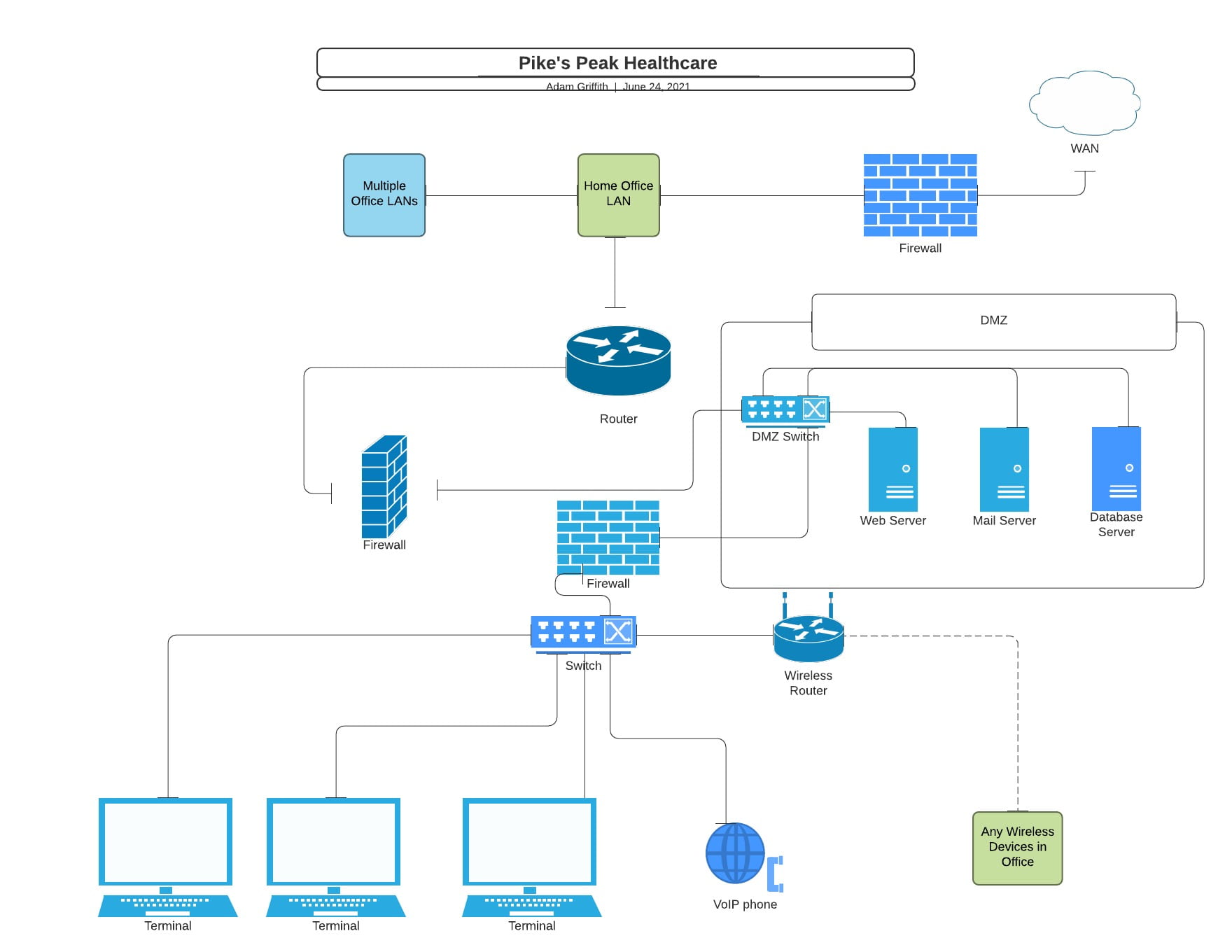
Sample Security Policy
Overview
In order to provide the maximum amount of security, Across the States Bank has implemented a security policy affecting all systems and employees. Please review the contents of this document, thoroughly.
Purpose
The purpose of this policy is to provide a security standard that administrators can follow to keep the network secure. This policy will also inform the rest of the employees how to keep the network safe and why access is restricted or granted.
Scope
This policy applies to all administrators, employees, temporary employees, independent auditors, and contractors. It also applies to all servers, devices, and workstations.
General Requirements
All Servers, routers, and switches must be physically locked within the data center. Branch location servers will be locked inside a data closet. Branch administrators will be issued a key card for access to the data closet. Access to the data center is restricted to IT staff and administrative staff. IT and administrative staff will be issued a key card for access to the data center. Data center access also requires a thumb print. All server locations and the topology of the network is to be recorded in the network topology chart. Any change made to network topology must be immediately updated within the topology chart. All employees have an assigned workstation. If a workstation is not working, an administrator must be notified so that employees may log on to another workstation.
Auditing
All attempted network logons will be monitored and recorded. Any unsuccessful logons will be recorded. Any attempt to logon to an unassigned workstation will be recorded and will be investigated. Any changes made to the network will be logged and reviewed periodically. Access to system resources will be logged and reviewed periodically. For any attempt to logon, access resources, or change the network without permissions, an alert will be issued immediately. These alerts will be investigated and may be grounds for dismissal. Internet usage is monitored. Accessing websites not related to an employee’s job description will result in a warning. If it continues to happen, it may result in dismissal.
Internet Access
Internet access is restricted to trusted sites. Access only those sites needed to perform your job. All Internet communications will use IPsec.
Email is only for internal purposes. There is to be no emailing outside the network. Do not download or distribute any suspicious file attached in an email. If unsure about an email attachment, please contact an administrator.
System Security
Proxy firewalls are placed on all devices that access the Internet. Packet filtering firewalls are placed on all devices that traverse the network not related to Internet access. All data is encrypted using the Advanced Encryption Standard (Bernstein & Cobb, n.d.). All external media drives are disabled except for administrators. Any attempt to insert external media into a drive could be ground for dismissal. All system updates and patches are set to download automatically. Implementation of updates and patches will first be tested in the lab setting. As soon as deemed safe, these updates and patches will be deployed. Symantec antivirus software is installed on all systems to protect from viruses and malware (G2.com, n.d.).
Policy Compliance
Compliance is monitored through alerts, audits, and physical inspections. Any exception to the policy must be approved by an administrator. An employee who does not follow these policies may be subject to termination.
Sample SQL Code and Dashboard
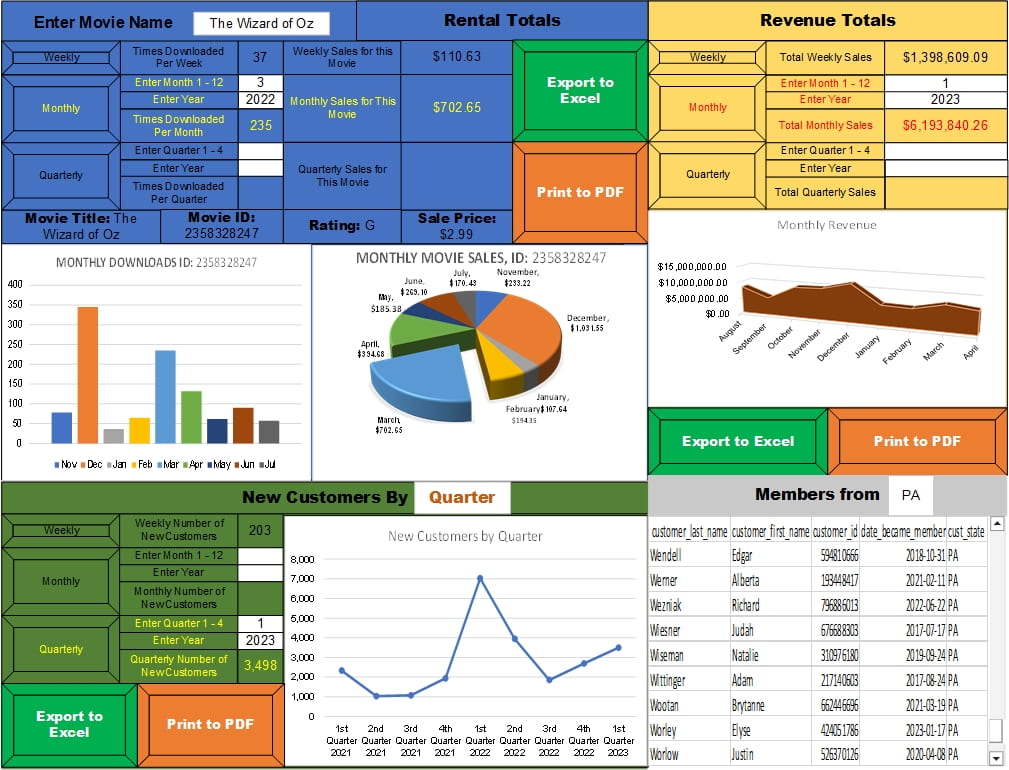
This is the SQL code used by the dashboard to obtain information about the movie name, movie rating, how often the movie was rented, and the total times it was downloaded in the past week given the movie title (Coronel & Morris, 2018d, 2018e, 2018g; w3schools, n.d.).
SELECT movies.movie_title AS ‘Movie Name’, customer_rentals.movie_id AS ‘Movie ID Number’, movies.movie_rating AS ‘Rating’, COUNT(customer_rentals.movie.id) AS ‘Times Downloaded Per Week’, COUNT(customer_rentals.movie_id) * movies.sale_price AS ‘Weekly Sales for This Movie’
FROM customer_rentals JOIN movies ON(customer_rentals.movie_id = movies.movie_id)
WHERE movie_title = ‘(enter movie name from dashboard)’ AND customer_rentals.rental_date <= GETDATE() AND customer_rentals.rental_date >= GETDATE() – 7
GROUP BY movies.movie_title, customer_rentals.movie_id, movies.movie_rating, customer_rentals.rental_date, movies.sale_price
This is the SQL code used by the dashboard to obtain information about the movie name, movie rating, how often the movie was rented, and the total times it was downloaded in a given quarter given the movie title, a specific year, and a specific quarter (Coronel & Morris, 2018d, 2018e, 2018g; w3schools, n.d.).
SELECT movies.movie_title AS ‘Movie Name’, customer_rentals.movie_id AS ‘Movie ID Number’, movies.movie_rating AS ‘Rating’, COUNT(customer_rentals.movie_id) AS ‘Times Downloaded Per Quarter’, COUNT(customer_rentals_movie.id) * movies.sale_price AS ‘Quarterly Sales for This Movie’, DATEPART(YEAR, customer_rentals.rental_date) AS ‘Year’, DATEPART(qq, rental_date) AS ‘Quarter’
FROM customer_rentals JOIN movies ON(customer_rentals.movie_id = movies.movie_id)
WHERE movie_title = ‘(enter movie name from dashboard)’ AND WHERE DATEPART(YEAR, customer_rentals.rental_date_) = ‘(enter year from dashboard)’ AND DATEPART(qq, customer_rentals.rental_date) = ‘(enter quarter 1 – 4 from dashboard)’
GROUP BY movies.movie_title, customer_rentals.movie_id, movies.movie_rating, customer_rentals.rental_date, movies.sale_price
This is the SQL code used by the dashboard to obtain information about the movie name, movie rating, how often the movie was rented, and the total times it was downloaded in a given month given the movie title, a specific year, and a specific month (Coronel & Morris, 2018d, 2018e, 2018g; w3schools, n.d.).
SELECT movies.movie_title AS ‘Movie Name’, customer_rentals.movie_id AS ‘Movie ID Number’, movies.movie_rating AS ‘Rating’, COUNT(customer_rentals.movie_id) AS ‘Times Downloaded Per Month’, COUNT(customer_rentals_movie.id) * movies.sale_price AS ‘Monthly Sales for This Movie’, DATEPART(YEAR, customer_rentals.rental_date) AS ‘Year’, DATEPART(mm, rental_date) AS ‘Month’
FROM customer_rentals JOIN movies ON(customer_rentals.movie_id = movies.movie_id)
WHERE movie_title = ‘(enter movie name from dashboard)’ AND WHERE DATEPART(YEAR, customer_rentals.rental_date_) = ‘(enter year from dashboard)’ AND DATEPART(mm, customer_rentals.rental_date) = ‘(enter month 1 – 12 from dashboard)’
GROUP BY movies.movie_title, customer_rentals.movie_id, movies.movie_rating, customer_rentals.rental_date, movies.sale_price
This SQL code is used by the dashboard to give the number of new members for the past week (Coronel & Morris, 2018d, 2018e, 2018g; w3schools, n.d.).
SELECT COUNT(membership_number) AS ‘Weekly Number of New Customers’
FROM customers WHERE date_became_member <= GETDATE() AND date_became_member >= GETDATE() – 7
GROUP BY membership_number
This SQL code can be used by the dashboard to give the number of new members for the quarter given the year and the quarter (Coronel & Morris, 2018d, 2018e, 2018g; w3schools, n.d.).
SELECT COUNT(membership_number) AS ‘Quarterly Number of New Customers’, DATEPART(YEAR, date_became_member) AS ‘Year’, DATEPART(qq, date_became_member) AS ‘Quarter’
FROM customers WHERE DATEPART(YEAR, date_became_member) = ‘(enter year from dashboard)’ AND DATEPART(qq, date_became_member) = ‘(enter quarter 1 – 4 from dashboard)’
GROUP BY membership_number, date_became_member
This SQL code can be used by the dashboard to give the number of new members for the month given the year and the month (Coronel & Morris, 2018d, 2018e, 2018g; w3schools, n.d.).
SELECT COUNT(membership_number) AS ‘Monthly Number of New Customers’, DATEPART(YEAR, date_became_member) AS ‘Year’, DATEPART(mm, date_became_member) AS ‘Month’
FROM customers WHERE DATEPART(YEAR, date_became_member) = ‘(enter year from dashboard)’ AND DATEPART(mm, date_became_member) = ‘(enter month 1 – 12 from dashboard)’
GROUP BY membership_number, date_became_member
This SQL code gives the total amount of revenue for the past week (Coronel & Morris, 2018d, 2018e, 2018g; w3schools, n.d.).
SELECT SUM(transaction_amount) as ‘Total Weekly Sales’, DATEPART(YEAR, rental_date) AS ‘Year’, DATEPART(qq, rental_date AS ‘Quarter’
FROM financial_transactions JOIN customer_rentals ON(financial_transactions.item_rental_id = customer_rentals.item_rental_id)
WHERE customer_rentals.rental_date) <= GETDATE() AND customer_rentals.rental_date >= GETDATE – 7
GROUP BY transaction_amount, rental_date
This SQL code gives the total amount of revenue for the quarter given the year and quarter (Coronel & Morris, 2018d, 2018e, 2018g; w3schools, n.d.).
SELECT SUM(transaction_amount) as ‘Total Quarterly Sales’, DATEPART(YEAR, rental_date) AS ‘Year’, DATEPART(qq, rental_date AS ‘Quarter’
FROM financial_transactions JOIN customer_rentals ON(financial_transactions.item_rental_id = customer_rentals.item_rental_id)
WHERE DATEPART(YEAR, rental_date) = ‘(enter year from dashboard)’ AND DATEPART(qq, rental_date_out) = ‘(enter quarter 1 – 4 from dashboard)’
GROUP BY transaction_amount, rental_date
This SQL code gives the total amount of revenue for the month given the year and month (Coronel & Morris, 2018d, 2018e, 2018g; w3schools, n.d.).
SELECT SUM(transaction_amount) as ‘Total Monthly Sales’, DATEPART(YEAR, rental_date) AS ‘YEAR’, DATEPART(mm, rental_date AS ‘Month’
FROM financial_transactions JOIN customer_rentals ON(financial_transactions.item_rental_id = customer_rentals.item_rental_id)
WHERE DATEPART(YEAR, rental_date) = ‘(enter year from dashboard)’ AND DATEPART(mm, rental_date_out) = ‘(enter month 1 – 12 from dashboard)’
GROUP BY transaction_amount, rental_date
Finally, this SQL code lists the customers that are members and when they joined from a specific state given the state (Coronel & Morris, 2018d, 2018e, 2018g; w3schools, n.d.).
SELECT customer_last_name, customer_first_name, customer_id, date_became_member, cust_state
FROM customers
WHERE member_yn = ‘Y’ AND cust_state = ‘enter state from dashboard’
ORDER BY customer_last_name ASC
Dashboard